

Retention Policy Business Central: What It Actually Does
If your Business Central database keeps growing, you’ve probably already researched retention policy Business Central options — Microsoft’s native way to clean up old data — and wondered if it’s actually enough for your situation. Microsoft’s native tool for cleaning up outdated data. You may have even set one up, expecting it to shrink your database meaningfully. Then nothing much changed, and now you’re stuck wondering whether retention policies just aren’t configured right, or whether they were never going to solve your actual problem.
They probably weren’t. Here’s why, and what actually will.
What Business Central’s Native Retention Policy Actually Does
Retention policies, as documented by Microsoft, let you set up automated rules that periodically delete outdated log entries and archived records on a defined schedule. It’s a genuinely useful feature — but the scope is narrower than most people assume when they first hear “retention policy for Business Central.”
What it’s built for is exactly what it sounds like: log-style data with no ongoing business value — change logs, notification entries, integration logs, that category of record. Set a schedule, set an age threshold, and Business Central quietly deletes anything older than that threshold, permanently.
Where Retention Policies Fall Short
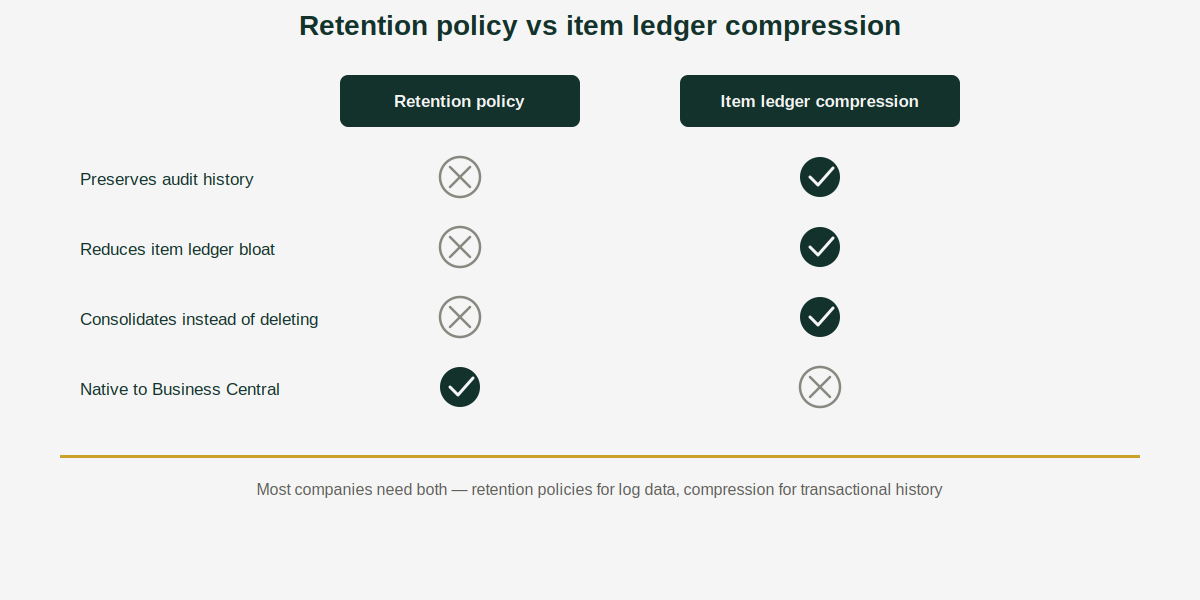
The problem most people run into: retention policies don’t touch item ledger entries or posted documents — the records actually responsible for most database bloat in a company that’s been live on Business Central for several years. Years of posted sales invoices, credit memos, transfer orders, and shipments just aren’t in scope.
And even where retention policies do apply, they delete outright. There’s no summarization, no consolidation — the data is just gone. For a company under audit requirements, or one that needs historical totals available even if the line-level detail isn’t, that’s not a usable answer. You end up choosing between “database stays bloated” and “history disappears,” which isn’t really a choice at all.
This is the gap Acumens Item Ledger Compression is built for: instead of deleting item ledger entries and posted documents, it consolidates them into summarized records on a schedule you define — keeping the totals finance and audit teams need, while shrinking the database the same way retention policies shrink log data.
Retention Policy vs. Item Ledger Compression
| Native Retention Policy | Acumens Item Ledger Compression | |
|---|---|---|
| What it targets | Log entries, archived/system records | Item ledger entries, posted documents |
| What happens to the data | Deleted permanently | Consolidated into summary records |
| Audit/reporting history preserved | No | Yes |
| Reduces item ledger bloat | No | Yes |
| Setup | Native, built into Business Central | Third-party app, scheduled cut-off dates |
| Best for | System/log cleanup | Years of transactional history |
Which One Should You Use?
For most searches around retention policy business central, the real answer isn’t either/or — it’s both, used for what each is actually built for.
For most companies, this isn’t actually an either/or decision — it’s additive.
- Use retention policies for what they’re designed for: clearing out log data, notification history, and other system-level noise that has no reporting value once it’s expired.
- Use Item Ledger Compression for the transactional history — item ledger entries, sales and purchase documents, transfers, shipments — that retention policies can’t touch and that you can’t afford to simply delete.
If your database bloat is coming mainly from years of transaction volume rather than system logs (which, for most companies running Business Central for 3+ years, it is), retention policies alone won’t move the needle much. That’s the signal you need the consolidation approach instead.
FAQ
Does the Business Central retention policy feature delete data permanently?
Yes. Retention policies are designed to periodically delete outdated log entries and archived records on a schedule — there’s no summarization or recovery option once a record is removed under a retention policy.
Can I use retention policies and Item Ledger Compression together?
Yes, and for most companies this is the right setup — retention policies handle log-level cleanup, while Item Ledger Compression handles the transactional history (item ledger entries and posted documents) that retention policies don’t reach.
How do I reduce Business Central database size without losing audit history?
Retention policies aren’t the answer here, since they delete rather than summarize. Item ledger and posted document compression consolidates historical entries into summary records instead, preserving the totals needed for audits and reporting while still shrinking the database.
Does Business Central have native data compression for item ledger entries?
Not for entry-level consolidation. Business Central does offer table-level SQL compression (which reduces physical storage size without reducing row count) and retention policies (which delete rather than consolidate) — but neither replaces the item ledger compression functionality that earlier Dynamics NAV versions had and Business Central removed.
Already dealing with database bloat from years of item ledger entries rather than log data? See how Item Ledger Compression works for the full breakdown, or explore Acumens Item Ledger Compression directly.