

Acumens Claims & Rebates
Available from Microsoft AppSource and OnPrem
How to Manage Claims and Rebates in Business Central
If you sell through distributors, brokers, or volume-based pricing agreements, rebates are probably one of the more painful parts of your finance operation. Someone has to track which customers or vendors qualify, calculate what’s owed, make sure it gets posted to the right accounts, and keep an audit trail that survives a review. In Microsoft Dynamics 365 Business Central, this isn’t something the platform handles out of the box — and that gap is where a lot of finance teams end up stuck with spreadsheets.
Here’s what claims and rebate management actually involves in Business Central, why the native tools leave gaps, and how a purpose-built extension changes the picture.
What “Claims and Rebates” Actually Covers
Rebates aren’t a single transaction type — they’re a process that touches sales, purchasing, and the general ledger all at once. Broadly, they fall into two directions:
- Customer rebates, where you owe money back to a customer for hitting a volume threshold, participating in a program, or meeting a contract term.
- Vendor rebates, where a vendor owes you money back — often tied to purchase volume, broker commissions, or program participation on the buying side.
Both directions require the same basic capability: identify qualifying transactions, calculate what’s owed based on a rate structure, accrue or post the liability, and keep a document trail that ties back to the original sales or purchase transaction.
Where Business Central Falls Short Natively
Out of the box, Business Central is built for standard sales and purchasing — it doesn’t have a concept of tiered rebate rates, rebate categories, or automatic accrual triggered by shipment or receipt. That means most finance teams end up doing one of the following:
- Tracking rebate-eligible transactions manually in Excel
- Calculating rebate amounts outside the system and posting adjusting journal entries after the fact
- Missing rebate deadlines because there’s no automated trigger tied to shipment, invoice, or return posting
- Losing the audit trail between the original transaction and the rebate that was eventually paid or received
None of this is a knock on Business Central — it’s simply outside the scope of the base ERP. The problem shows up as your rebate programs get more complex: multiple tiers, minimum quantity or amount thresholds, broker commissions layered on top of customer rebates, or rebate rates that differ by item category and time period.
What a Purpose-Built Rebate Solution Adds
This is exactly the gap that Acumens Claims & Rebates Management was built to close inside Business Central — no bolt-on system, no manual reconciliation between two platforms. It lives natively in Business Central, using standard sales and purchase documents as the trigger point for rebate calculation.
A few of the core capabilities:
Dedicated Role Centers. Both customer and vendor rebate processing get their own role center, giving finance and sales teams a single entry point for setup, transaction processing, and rebate history — instead of hunting across multiple areas of the system.
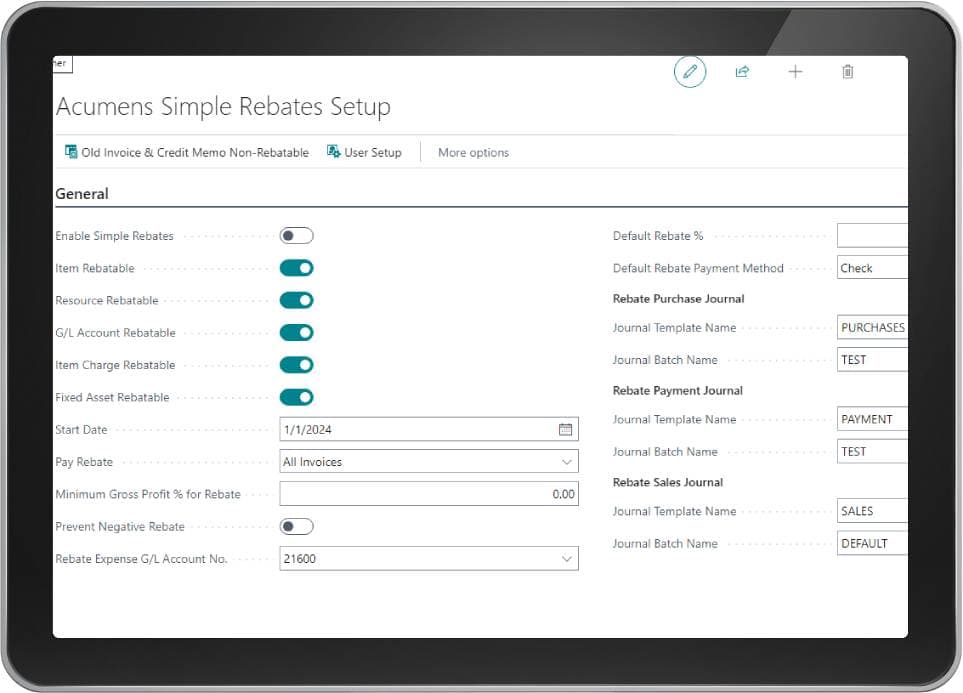
Rebate eligibility by item, resource, or G/L account. You control exactly what’s eligible for a rebate — whether that’s specific items, services and labor, or general ledger accounts — rather than applying rebate logic to everything by default.
Preview before you post. Before a sales order becomes an invoice, you can preview the calculated rebate amount — customer rebate, vendor commission, and employee commission — so there are no surprises after posting.
Automatic accrual on shipment or receipt. When auto-processing is enabled, rebates are calculated and accrued the moment an item is physically shipped or received — not after someone remembers to run a report. Returns automatically reverse or adjust the accrual, so your liability stays accurate in real time.
Tiered rate structures with minimum thresholds. Rebate rates can be set up with minimum quantity or minimum amount requirements, so a customer only qualifies for a given tier once they’ve actually hit the volume. As sales accumulate, the system recalculates against the correct tier automatically.
Broker and employee commission tracking. Rebate programs often come with a commission layer for the broker or salesperson who brought in the business. Vendor commission and employee commission can be calculated and posted alongside the customer rebate itself, using dedicated G/L accounts by rebate category.
Full document trail. Every rebate produces a posted rebate document tied back to the original sales invoice, credit memo, purchase receipt, or return — so if a rebate is questioned six months later, the answer is a few clicks away instead of a spreadsheet archaeology project.
Manual vs. Automated Rebate Management
| Manual Tracking | Automated (Acumens) | |
|---|---|---|
| Rebate calculation | Done outside Business Central, prone to error | Calculated automatically from rate tables |
| Accrual timing | Batch, after the fact | Real-time on shipment/receipt |
| Audit trail | Scattered across spreadsheets and emails | Fully posted documents linked to source transactions |
| Tiered thresholds | Manually monitored | Automatically applied as volume accumulates |
| Commission tracking | Separate process | Built into the same rebate calculation |
| Reporting | Manual reconciliation | Posted rebate history and detail reports on demand |
Frequently Asked Questions
Does Business Central have built-in rebate management?
No. Microsoft Dynamics 365 Business Central does not include native rebate calculation, tiered rate structures, or automatic accrual for customer or vendor rebates. Standard sales and purchase documents can be used to record transactions, but rebate logic — thresholds, rate tiers, commission splits, and automated posting — has to be added through an extension such as Acumens Claims & Rebates Management.
How do you set up rebates in Business Central?
With a dedicated rebate extension, setup starts with enabling rebate eligibility for items, resources, or G/L accounts, then defining rebate rates by customer, customer category, or item category. You also configure whether rebates post automatically on shipment/receipt, and which G/L accounts hold the rebate payable or receivable balance. Without an extension, “setup” typically means building a manual tracking spreadsheet outside the system.
Can Business Central automatically calculate tiered rebates?
Yes, with the right extension. Rebate rate tables can be configured with minimum quantity or minimum amount thresholds per tier, so the system automatically applies the correct rate as a customer’s cumulative purchases cross each threshold — without anyone manually checking volume against a tier boundary.
What’s the difference between customer rebates and vendor rebates in Business Central?
Customer rebates are amounts you owe a customer, typically for hitting a sales volume or program target, and are triggered off sales orders, invoices, and credit memos. Vendor rebates are amounts owed to you by a vendor, triggered off purchase orders, receipts, and purchase credit memos. Both directions require separate setup, rate tables, and posting logic, though the underlying mechanics are similar.
Can rebates be previewed before they’re posted?
Yes. A rebate preview action can calculate and display the expected customer rebate, vendor commission, and employee commission on a sales or purchase document before it’s posted as an invoice or credit memo — giving finance visibility into the financial impact before it hits the ledger.
Is there a Business Central extension specifically for claims and rebates?
Yes. Acumens Claims & Rebates Management is a Business Central extension that adds native rebate role centers, automated accrual on shipment/receipt, tiered rate structures, and broker/employee commission tracking directly into Business Central — without requiring a separate system or manual reconciliation.
Getting Started
If your team is still reconciling rebates in Excel at the end of every period, the fix isn’t a bigger spreadsheet — it’s giving Business Central the rebate logic it doesn’t have natively. Acumens Claims & Rebates Management plugs directly into your existing sales and purchase workflows, so your team keeps working the way it already does, and the rebate calculation just happens correctly in the background.
If you’d like to see how it would map to your specific rebate programs, reach out to the SBC Dynamics team — we work with Business Central customers on exactly this kind of setup every day.