

Acumens Claims & Rebates
Available from Microsoft AppSource and OnPrem
Automate claims, rebates, commissions, royalties & allowance accruals, ensuring accuracy and compliance while strengthening customer and vendor relations.
Manual vs. Automated Rebate Tracking in Business Central: What’s Costing You More?
Every finance team managing rebates in Microsoft Dynamics 365 Business Central eventually asks the same question: is it actually cheaper to keep doing this by hand? The spreadsheet already exists, someone already knows how to update it, and building out a “proper” rebate process feels like a project nobody has time for.
The honest answer is that manual rebate tracking usually costs more than it looks like. It is just spread across a dozen small inefficiencies instead of one visible line item. Here’s a real comparison of what each approach actually involves.
The Manual Process, Step by Step
In most Business Central environments without a dedicated rebate tool, here’s what rebate management looks like in practice:
- Someone exports sales or purchase data at the end of the period.
- They cross-reference it against a rebate agreement — often stored in a separate document, not the ERP.
- They calculate rebate amounts manually, applying tiers and thresholds by hand.
- They post an adjusting journal entry to record the rebate liability.
- They try to reconstruct, weeks or months later, which original transaction the rebate ties back to — usually when someone asks.
Every one of those steps is a place where things go wrong: a missed transaction, a tier threshold that wasn’t checked correctly, a rebate that never got posted because the period closed before anyone calculated it.
What It’s Actually Costing You
Time. Manual rebate calculation is a recurring, repetitive task — and it scales with your transaction volume. The more rebate programs you run, the more hours it eats every period.
Accuracy. Spreadsheet-based rebate calculations are hard to audit and easy to get wrong, especially when you’re layering tiered rates, minimum-quantity thresholds, and commission splits on top of the base rebate.
Timing. Rebates calculated after the fact mean your liability accounts don’t reflect reality in real time. That’s a problem for both financial reporting and cash flow planning — you don’t actually know what you owe (or are owed) until someone runs the manual process.
Audit risk. When a customer or vendor disputes a rebate amount, or an auditor asks for the trail from the original transaction to the posted rebate, “it’s in a spreadsheet somewhere” is not a great answer.
Missed rebates. This is the quiet one. Rebate programs with minimum thresholds are easy to miss manually — nobody’s actively watching cumulative volume against a tier boundary, so rebates either get underpaid or paid late.
What Automated Rebate Management Looks Like Instead
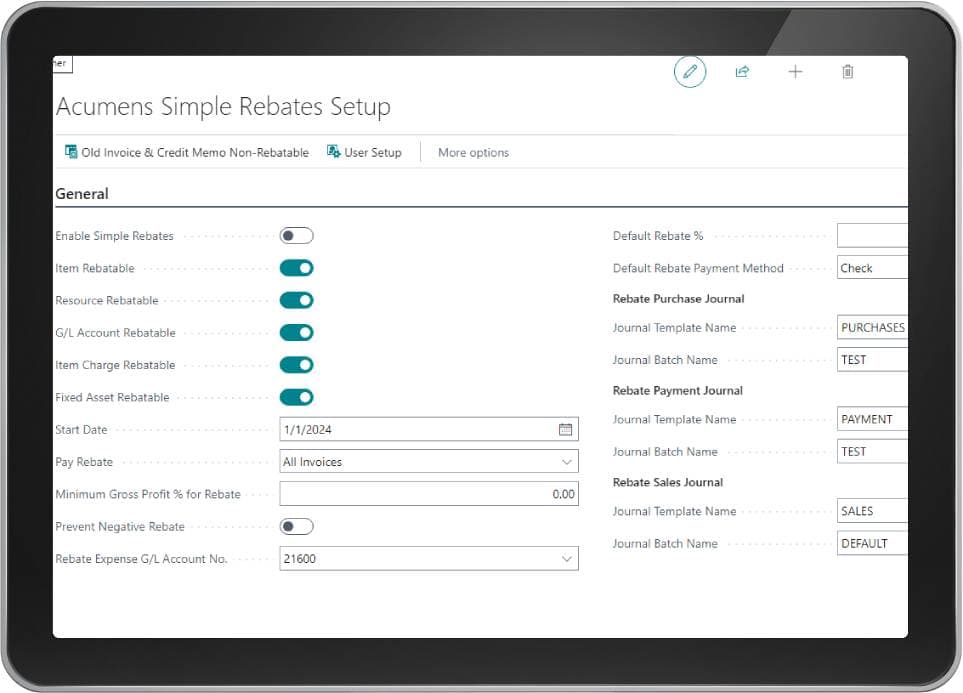
Acumens Claims & Rebates Management builds rebate logic directly into Business Central’s native sales and purchase workflows, so the process above collapses into something that mostly runs itself:
- Rebates are calculated automatically when a sales order or purchase order is shipped, invoiced, or received — no export, no manual cross-reference.
- Tiered thresholds are applied in real time. As a cumulative quantity or amount crosses a tier boundary, the correct rate is applied automatically going forward.
- Accruals stay current. Because rebates post on shipment and reverse automatically on returns, your rebate payable and receivable balances reflect what’s actually owed at any given moment — not what was true at last period close.
- Every rebate has a document trail. Posted rebate documents link directly back to the originating sales invoice, credit memo, purchase receipt, or return, so answering “why was this rebate calculated this way” takes seconds.
- Commissions are handled in the same pass. Broker and employee commissions tied to a rebate program are calculated and posted alongside the customer or vendor rebate itself, rather than as a separate manual exercise.
- You can preview before you commit. Sales and purchase documents support a rebate preview, so you can see the calculated amount before anything posts — useful for catching setup issues before they hit the ledger.
The Real Comparison
| Manual | Automated | |
|---|---|---|
| Calculation effort per period | Hours, recurring | Minimal — happens on transaction posting |
| Risk of missed tier thresholds | High | Eliminated — system tracks cumulative volume |
| Liability accuracy | Stale until manually updated | Real-time |
| Audit trail | Manual reconstruction | Built-in, document-linked |
| Commission handling | Separate process | Integrated into the rebate calculation |
| Scalability | Gets worse as volume grows | Scales with transaction volume automatically |
Frequently Asked Questions
Why is manual rebate tracking risky in Business Central?
Manual rebate tracking relies on spreadsheets maintained outside Business Central, which creates gaps between the ERP and the actual rebate liability. Common risks include missed tier thresholds, rebates calculated after the period has already closed, inconsistent audit trails, and rebate amounts that don’t match what’s recorded in the general ledger.
How much time does manual rebate calculation typically take?
It varies by transaction volume and program complexity, but manual rebate calculation is a recurring task that repeats every period — weekly, monthly, or quarterly depending on the rebate agreement. Teams with multiple rebate programs, tiered rates, or commission splits often spend several hours per period on calculation and reconciliation alone.
What triggers automatic rebate accrual in Business Central?
With an automated rebate extension, accrual is triggered by the physical movement of goods — specifically, when a sales shipment or purchase receipt is posted. This means the rebate liability is recorded in real time rather than being calculated in a separate batch process after the fact.
Can automated rebates handle returns and credit memos?
Yes. When a return is processed and a credit memo is posted, an automated rebate system reverses or adjusts the original rebate accrual accordingly, keeping the rebate payable or receivable balance accurate without a manual correcting entry.
Does automating rebates affect financial audit readiness?
It generally improves it. Automated rebate systems post rebate documents that link directly back to the originating sales or purchase transaction, so auditors and finance teams can trace any rebate amount to its source without reconstructing the calculation from spreadsheets or emails.
How do I know if I need automated rebate management?
If your rebate programs involve tiered rates, minimum quantity or amount thresholds, broker or employee commissions, or enough transaction volume that period-end reconciliation takes real effort, manual tracking is likely costing more in time and error risk than an automated solution would.
When It’s Worth Making the Switch
If you’re running one simple rebate program with a handful of customers, a spreadsheet might genuinely be fine. But once you’re dealing with tiered rates, multiple rebate categories, broker commissions, or enough transaction volume that closing the books involves real reconciliation work — the manual process isn’t saving you anything. It’s just deferring the cost to a busier version of you, later.
Acumens Claims & Rebates Management is built to remove that trade-off entirely inside Business Central. If you want to see what automating your specific rebate programs would actually look like, the SBC Dynamics team can walk through your setup and show you the difference directly in your own environment.
For more information visit acumens.com