

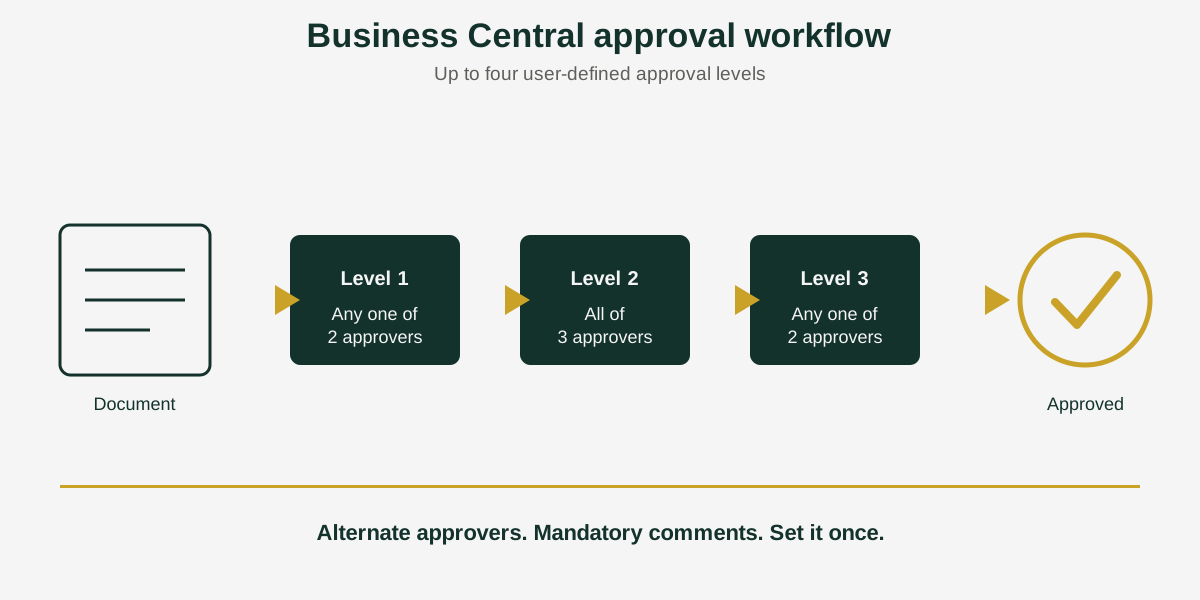
Short answer: A Business Central approval workflow routes documents to the right people before they are released. Acumens Document Approvals Management extends the standard workflow with up to four user-defined approval levels, alternate approvers, mandatory comments and attachments, and purchase amount tolerances, for Microsoft Dynamics 365 Business Central and Dynamics NAV.
Most companies start with a simple rule: a manager approves purchase orders over a set amount. Then the business grows. A second approver is needed above a higher limit, someone is on leave when an order arrives, and a small price change sends a finished order back to the start. At that point the approval process becomes a source of delay and workarounds.
Acumens Document Approvals Management, from SBC Dynamics ERP, is built for that stage. It adds configurable approval rules on top of the Business Central workflow, so the process follows how your company actually signs things off.
What is Acumens Document Approvals Management?
It is a Business Central extension that extends the standard approval workflow sequence with up to four user-defined levels. Each level can have one approver or several, and you decide how the level is released. It covers sales, purchase and service documents as well as general and item journals.
6 features that make approvals work in practice
1. Dynamic approval levels
Define up to four levels of your own, such as team lead, department head, finance, and director. A document moves through each level in order.
2. Alternate approvers
Assign more than one approver to a level. Set them as alternates, so any one of them can release the level, or as non-alternates, so all of them must approve. Each approver can also be mandatory or optional. This is the feature that stops approvals stalling when one person is away.
3. Mandatory comments and attachments
Require a comment or an attachment before a document can be submitted. Approvers then see the reason and the supporting paperwork up front, and do not have to ask for it.
4. Purchase amount tolerance
Small changes to a purchase order amount do not have to trigger a new approval. Set a tolerance as a fixed amount or a percentage, globally or per vendor. A vendor setting overrides the global one.
5. Shipping and receiving before approval
If your process allows it, an unapproved sales order can ship, and an unapproved purchase order can be received. Stock movement does not have to wait for the paperwork.
6. User-defined notifications
Each user chooses how to be told about approvals: a note in Business Central, an email, or both. To control how those emails look, see Acumen’s e-Mailing.
Which documents does it cover?
- All standard sales documents
- All standard purchase documents
- Service documents
- General journals
- Item journals
Who should use it?
It suits companies whose approval rules have more than one step, more than one possible approver, or exceptions that the basic workflow handles awkwardly. Typical examples are purchasing teams with spending limits by role, and finance teams that need a second sign-off on journals.
Availability
Acumens Document Approvals Management is available from Microsoft AppSource and for on-premises deployments. See the AppSource listing for current pricing and trial terms. Browse all Acumens add-ons for Business Central on our add-ons page.
Frequently Asked Questions
How do I set up multi-level approvals in Business Central?
Business Central includes approval workflows that you configure on the Workflows page. Acumens Document Approvals Management extends the standard workflow sequence with up to four user-defined approval levels, so each document can pass through the levels your process needs.
Can more than one person approve at the same approval level?
Yes. Each level can have several approvers. You can set them as alternates, where any one of them can release the level, or as non-alternates, where all of them must approve. Each approver can also be mandatory or optional.
Can I require a comment or attachment before a document is sent for approval?
Yes. Comments and attachments can be made mandatory, so approvers always see the supporting information when a document reaches them.
Does a small change to a purchase order amount send it back for approval?
Not if a tolerance covers it. You can set a fixed amount or a percentage, globally or per vendor, and a vendor setting overrides the global one. Changes within the tolerance avoid re-approval.
Can an order ship or be received before approval is finished?
Yes, if you choose to allow it. An unapproved sales order can ship, and an unapproved purchase order can be received, so stock movement is not held up by the approval step.
Which documents can go through the approval workflow?
All standard sales documents, all standard purchase documents, service documents, general journals and item journals.
Does Acumens Document Approvals Management work on-premises?
It is available from Microsoft AppSource and for on-premises deployments.
Want to see how the approval levels would map to your own sign-off rules? Contact the SBC Dynamics ERP team, or find the app on Microsoft AppSource.
Related reading
Business Central retention policy vs compression