

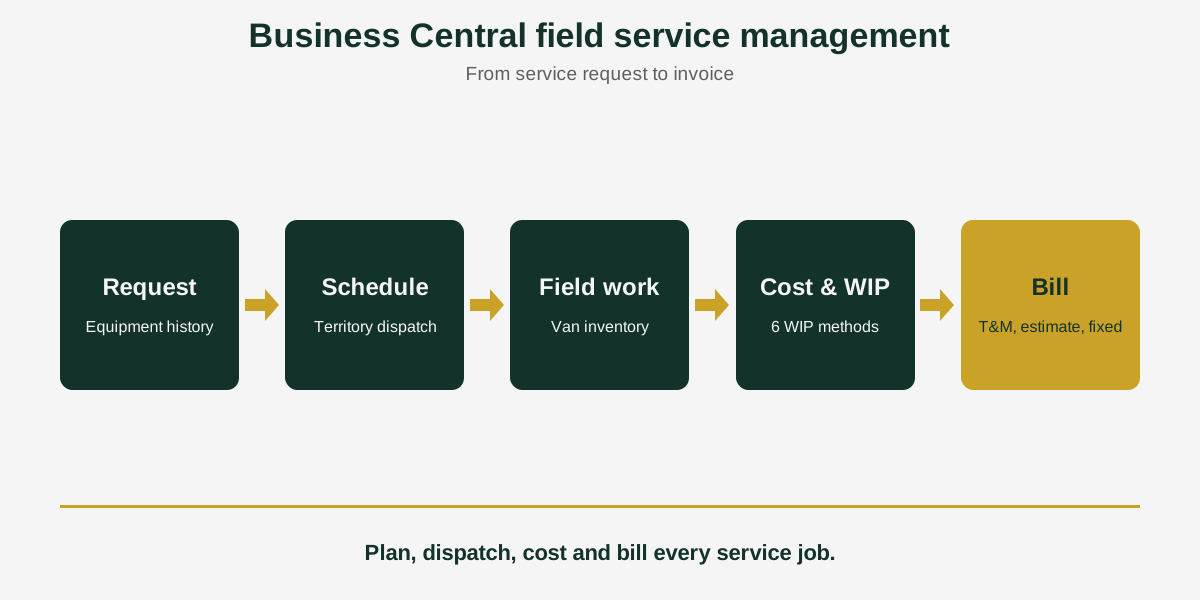
Business Central Field Service Management: Follow a Job from Request to Invoice
Short answer: Business Central field service management covers service orders, equipment history, technician scheduling, job costing and billing. Acumens Service Job Management extends it with planned maintenance, six WIP methods, three billing models, territory-based dispatch and a field service web app, for Business Central and Dynamics NAV.
A pump stops working on a customer’s site on Monday morning. By Monday afternoon you need to know who can go, which parts are already on their van, what the visit will cost, and how it will be billed. If those answers sit in different spreadsheets, the job is slower and less profitable than it should be.
Acumens Service Job Management, from SBC Dynamics ERP, keeps all of that inside Business Central. It is built for businesses that service equipment for customers, with technicians in the field and billing that changes from contract to contract. It works inside Business Central itself, so it is separate from Microsoft’s Dynamics 365 Field Service product.
What is field service management?
Field service management is the work of sending technicians to customer sites to install, maintain and repair equipment, and managing the scheduling, parts, time and billing that go with it. In Business Central, that means the service order, the technician, the parts and the invoice all have to stay connected.
Follow one job from request to invoice
1. Log the request and keep the equipment history
Create service requests and service orders for the equipment you maintain. Every piece of equipment keeps its own service history of repairs, maintenance and part replacements, so the next technician sees what was done before.
2. Plan maintenance before it becomes a breakdown
The Planned Service Worksheet lets customer service users review upcoming work and send service-due reminders, so routine maintenance does not depend on someone remembering.
3. Schedule the right technician
The app plans technician activities based on tickets, availability and expertise. It also supports territory-based scheduling and daily dispatch lists, so each technician knows where to go and the dispatcher can see the workload.
4. Keep the right parts available
A service order creates demand that shows up in item availability. You can buy materials on a job-specific purchase order or on a combined one, and van inventory tracking shows what each technician is carrying.
5. Record the work in the field
A field service web app, usable on mobile devices and laptops, lets technicians view job details and customer information, check inventory, record the materials they used and update the ticket status for billing. Technicians also log time per job on time sheets, which feeds costing and billing.
6. Inspect and test
Define testing procedures and checklists for each service item group, record the results with photo uploads, and let a failed inspection generate a new service order, so a failed check does not get lost.
7. Track cost and bill the way the contract says
The app tracks labor, material and overhead costs for each job. It offers six WIP methods, which post to the general ledger: Actuals, Completed Contract, Cost of Sales, Cost Value, Percentage of Completion and Sales Value. You can also preview postings before they are committed. For billing, choose Time & Material, Estimate Billing or Fixed Charge for each job.
A quick test for your current service process
Answer these honestly. Each “no” is a gap the app is designed to close.
- Can a dispatcher see each technician’s workload and territory on one list?
- Can you see which parts a technician has on the van?
- Can you bill one job by actual time and materials and another at a fixed charge?
- Do your WIP figures reach the general ledger without manual journals?
- Does a failed inspection automatically start the follow-up work?
Availability
Acumens Service Job Management is available from Microsoft AppSource for cloud and as an on-premises version. For a demo, setup help or training, contact the SBC Dynamics ERP team.
Frequently Asked Questions
What is field service management in Business Central?
It is the work of sending technicians to customer sites to maintain and repair equipment, and managing the scheduling, parts, time, costing and billing that go with it. Acumens Service Job Management covers these steps inside Business Central.
What features should a field service solution for Business Central have?
Look for technician scheduling and dispatch, mobile access for technicians, parts and van inventory tracking, job costing with WIP, and flexible billing. Acumens Service Job Management includes all of these, plus planned maintenance reminders and inspection checklists.
How do I manage service orders in Business Central?
Business Central includes basic service orders. Acumens Service Job Management extends them with service requests, a service history for each piece of equipment, technician scheduling, job costing and flexible billing, so the whole job is managed in one place.
Can I bill a service job by estimate or at a fixed price?
Yes. The app offers three billing models: Time & Material, Estimate Billing and Fixed Charge. You can bill on actual usage, on an approved estimate or on an agreed amount.
Which WIP methods are available for service jobs?
Six: Actuals, Completed Contract, Cost of Sales, Cost Value, Percentage of Completion and Sales Value. They post to the general ledger, and you can preview postings before committing them.
How do I schedule technicians in Business Central?
The app plans technician activities based on tickets, availability and expertise. It also supports territory-based scheduling and daily dispatch lists.
Can technicians record parts and update jobs from a phone or laptop?
Yes. The field service web app works on mobile devices and laptops. Technicians can see job details and customer information, check inventory, record materials used and update the ticket status for billing.
How do I track the parts on a technician’s van?
The app includes van inventory tracking, so you can see the parts and consumables each technician is carrying.
Can I send reminders for planned maintenance?
Yes. The Planned Service Worksheet lets customer service users review work that is due and send service-due reminders.
Is Acumens Service Job Management cloud-based or on-premises?
Both. It is available from Microsoft AppSource for cloud Business Central and as an on-premises version.
Closing line: Want to see how a service job would run through your own process? Contact the SBC Dynamics ERP team, or get paid faster with Acumens e-Payments and browse our other Acumens add-ons.