

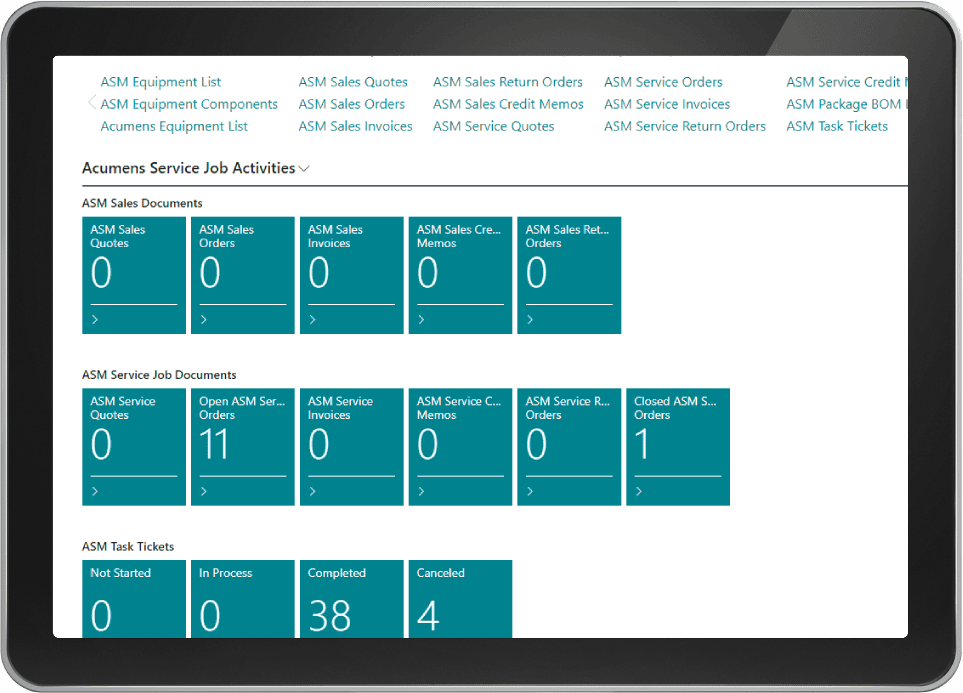
Acumens Service Job Management
Acumens Service Job Management for Microsoft Business Central and Dynamics NAV is a comprehensive solution engineered to streamline and elevate complex equipment servicing activities. Deploying specialized field service management software offers an enterprise suite of submodules designed to manage equipment maintenance, track time and material usage, handle service costing, automate technician scheduling, and execute planned maintenance while connecting operations through a dedicated technician web app and customer self-service portal.
Managing service dispatching, equipment repairs, and material requisitions through disconnected tools introduces operational friction, inventory discrepancies, and billing errors. Automating field service workflows directly inside your core ERP system ensures every technician assignment, spare part issuance, and inspection log remains fully auditable and aligned with corporate accounting records.
Table of Contents
1. Equipment Service Management
Utilizing full-featured field service management software inside Business Central empowers customer service managers to create and manage service requests and orders for equipment maintenance and repairs. Customers can track the real-time status of their service requests directly from the dedicated customer portal, ensuring complete operational transparency.
Additionally, the app maintains a detailed equipment service history record covering all repairs, scheduled maintenance routines, and part replacements for every piece of equipment. Using the built-in Planned Service Worksheet, customer service teams can easily review upcoming maintenance schedules and send automated service-due reminders directly to customers before equipment failure occurs.
2. Resource and Material Usage
Tracking field consumption requires integrated field service management software routines that monitor, track, and manage the inventory of materials and spare parts used for each individual service job. This allows service managers to perform detailed analysis of material consumption while accurately billing resource usage and labor hours for every dispatched ticket.
3. Material Availability and Material Requisition
Creating service orders automatically generates immediate material demand reflected in Item availability records. Required service materials can then be purchased using dedicated job purchase orders or consolidated purchase orders to fulfill total item demand efficiently across active service hubs.
4. Service Cost and Price Management
Deploying cloud-based field service management software enables financial administrators to track and manage costs associated with service operations, including direct labor, spare materials, and overheads. Service managers can configure promotional campaigns to incentivize customers while managing service Work in Progress (WIP) for ongoing service jobs, providing complete cost visibility throughout the entire service lifecycle.
5. Technician Scheduling and 6. Timesheet Management
Optimizing field dispatching relies on intelligent scheduling tools that plan technician activities based on service ticket priority, technician availability, and technical expertise. Clear visibility prevents scheduling conflicts and balances workloads to improve service quality and team productivity. Integrated timesheets monitor time spent by technicians on service jobs, enabling accurate job costing, customer billing, and internal payroll or absence tracking.
7. Service Inspection, 8. Customer Portal, and 9. Field Service Web App
Enterprise field service management software connects field technicians directly with back-office operations and customer touchpoints. Quality managers can set up standardized testing procedures, test instructions, and checklists for each service item group, recording inspection results and photo uploads to generate follow-up service orders automatically whenever issues arise.
The dedicated customer portal allows clients to submit equipment service requests, monitor job progress, and access historical repair logs. Meanwhile, the Field Service Technician Web App equips technicians on mobile devices, tablets, or laptops with real-time access to ticket details, spare parts consumption posting, and Van inventory stock visibility before executing field visits.
Driving Scalable Service Operations
Deploying robust field service management software capabilities inside Business Central allows service organizations to maximize equipment uptime, optimize technician efficiency, and expand enterprise service capacity seamlessly.
For more details, check our guide on Acumens History Management or read official documentation on Microsoft Dynamics 365 Architecture Models.