

Acumens History Management Enhancements
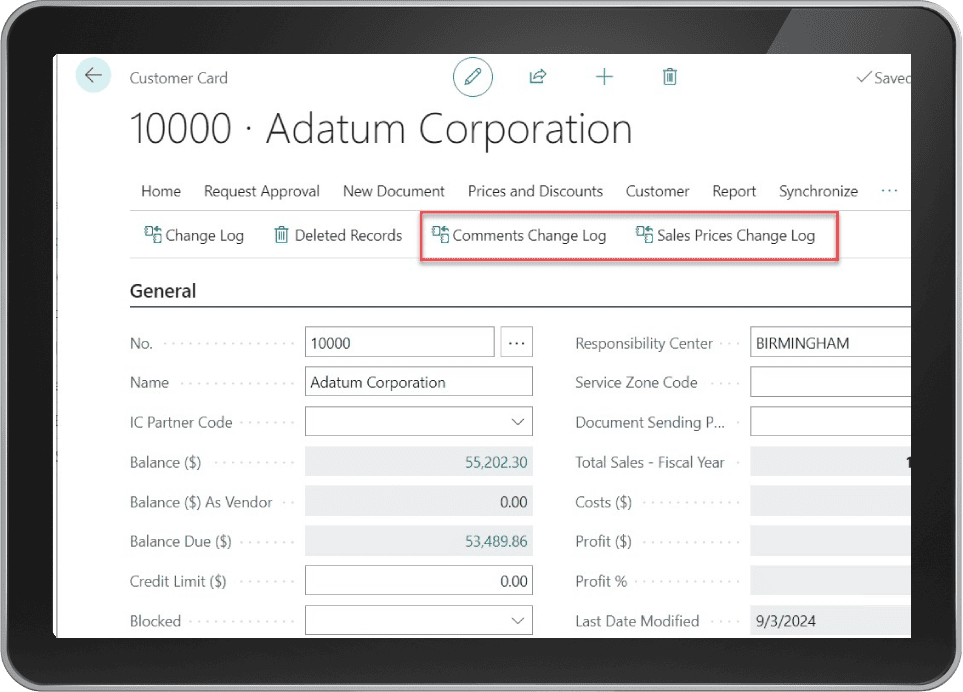
Acumens History Management Enhancements extends the core Acumens History Management app by introducing subsidiary tables change log data access directly from parent tables, along with additional data analysis tools to history data. Integrating high-performance database monitoring software capabilities within Microsoft Dynamics 365 Business Central improves operational analytics, user activity tracking, and overall database health.
Advanced enterprise environments require granular control over complex table dependencies, field-level revisions, and system resource allocation. By extending standard auditing limits, this database monitoring software solution empowers administrators to inspect nested table updates and diagnose performance bottlenecks before they disrupt daily enterprise operations or cause costly system downtime.
Managing extensive database change logs without specialized diagnostic tools often creates performance issues and complicates regulatory compliance audits. Implementing dedicated monitoring controls ensures that every field modification and table lock event gets recorded in structured storage tables. This architectural framework guarantees that system administrators retain full historical oversight without compromising daily ERP query execution speeds.
Table of Contents
Key Features Included in History Enhancements
Utilizing dedicated database monitoring software tools inside Business Central provides deep operational visibility into system modifications and historical record shifts. The features included in this app are as below:
- 1. Subsidiary Tables Change Log: The app allows access to subsidiary tables change log from the parent tables for ease of analysis (e.g., direct access to Sales Prices change log straight from the Customer card interface).
- 2. Field Query: This feature gives the user the ability to review individual field changes on one central interface. The retrieval is configured per table per field for targeted forensic analysis.
- 3. Table Locking Analysis: This feature allows analysis of time spent by users on a record during a change. If a user is running a resource-intense process, table locking tends to happen which stalls all system operations related to the locked table. Through this feature we are able to tell time spent by a user on a record, hence isolating issues that result in database locks. Analysis is done for a specific table selected by the user for a select date and can be analyzed Per User or Per Record.
Optimizing Table Locking and Performance Diagnostics
Unresolved database stalls degrade system responsiveness during peak business hours. Deploying embedded database monitoring software metrics allows IT teams to monitor active record duration and identify processes causing lock conflicts. Isolate heavy user processes quickly to prevent system-wide operational delays and maintain smooth ERP execution across all user workstations.
Furthermore, evaluating table usage patterns per user or per record simplifies technical troubleshooting for database administrators. System engineers can reconfigure process workflows or optimize user permission sets based on real-time execution metrics, safeguarding long-term database stability and operational efficiency.
Enhancing Field-Level Audits and Operational Visibility
Tracking nested record updates manually across disparate tables increases administrative burden and compliance risks. Utilizing cloud-based database monitoring software features enables compliance officers to audit subsidiary price changes, credit limit modifications, and master file updates directly from primary master cards. Having instant access to field-level histories ensures complete operational transparency during regulatory audits.
Centralized historical query tools also accelerate internal forensic investigations. When discrepancies arise during monthly financial reconciliations, compliance teams can review exact field revision timelines without restoring archived database backups or requesting complex SQL scripts from technical administrators.
Driving Scalable Database Performance
Ultimately, long-term ERP efficiency relies on proactive diagnostic tools and structured audit logging routines. Deploying full-featured database monitoring software extensions inside Business Central allows growing companies to maintain optimal system performance while enforcing rigorous data governance standards for future expansion.
For more details regarding core system configurations, check our guide on Acumens History Management or read official documentation on Microsoft Dynamics 365 Architecture Models.