

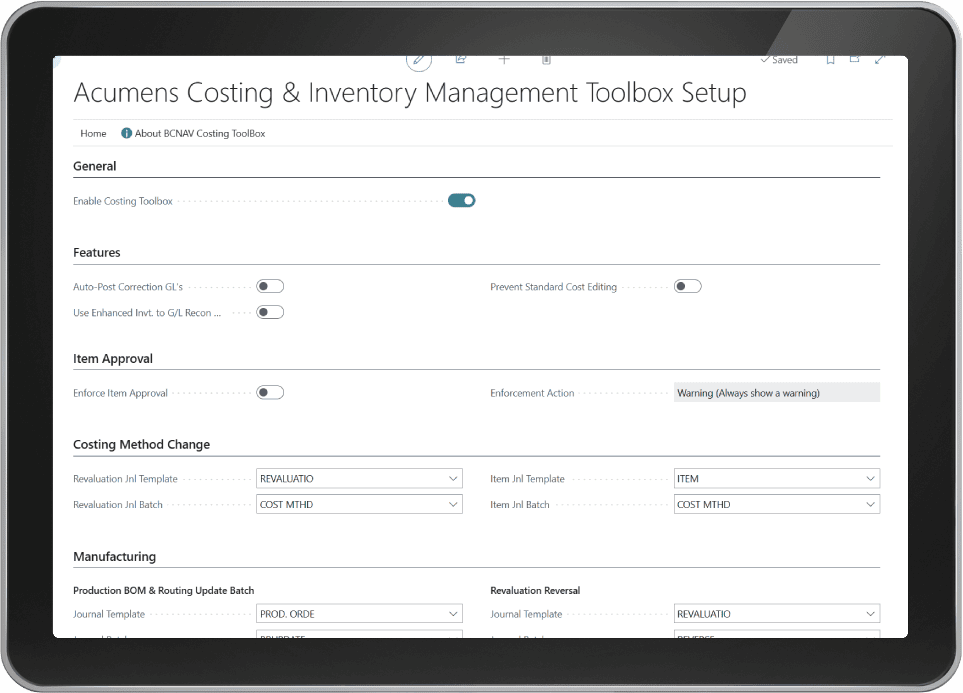
Acumens Costing & Inventory Management Toolbox enhances and simplifies cost management within Microsoft Dynamics 365 Business Central. It provides powerful costing enhancements that help businesses maintain accurate inventory costs, improve costing processes, and overcome standard
-
Item Costing Method Change
This feature enables businesses to safely change an item’s costing method without creating a new item. It automates the complex tasks required for the transition, including processing open item ledger entries, creating revaluation journals where necessary, updating unit costs on open and incomplete documents, and applying the new costing method and unit cost to the item. This ensures the change is completed accurately while maintaining inventory and financial integrity.
-
Enhanced Inventory to G/L Reconciliation Report
This feature replaces the standard Business Central Inventory to G/L Reconciliation report with an enhanced version that provides more accurate reconciliation results. It correctly offsets purchase and sales returns against the corresponding uninvoiced inventory balances, helping eliminate reconciliation discrepancies and improving the accuracy of inventory-to-general ledger reporting.
It is also designed as a corrective and management suite, addressing common costing and inventory posting errors that can distort financials and reporting. Its features are built to automate corrections, maintain audit trails, and restore accuracy across production, transfers, and inventory records. These features include:
-
Correct Unit Cost Issues
This feature reverses erroneous value entries and reposts them with the correct unit cost, ensuring production orders reflect accurate consumption and output values. It extends beyond production orders into transfer documents, where wrong costs can flow into shipments and receipts, and even allows for single-entry corrections at the Item Ledger Entry level when only one posting is affected.
-
Revaluation Reversal
It enables users to undo mistakenly posted revaluations. Corrections can be applied to a single selected entry or across multiple entries using filters, providing flexibility depending on the scale of the error.
-
Production BOM and Routing Updates.
Finished Production Orders can be reopened to apply updates to BOM quantities or routing steps, ensuring that variances and ledger entries are corrected accordingly. When dealing with larger datasets, batch functionality allows multiple production orders to be reopened and adjusted at once, making the correction process faster and more efficient.
-
Correct Inventory Posting Issues
This processing report is designed to fix wrong posting dates, misaligned GL accounts, and unit cost errors. It includes sub-functions such as correcting adjust cost posting date issues, reversing and reapplying value entries with the correct GL accounts, and batch correcting unit cost issues using filters to clean up multiple entries at once.