

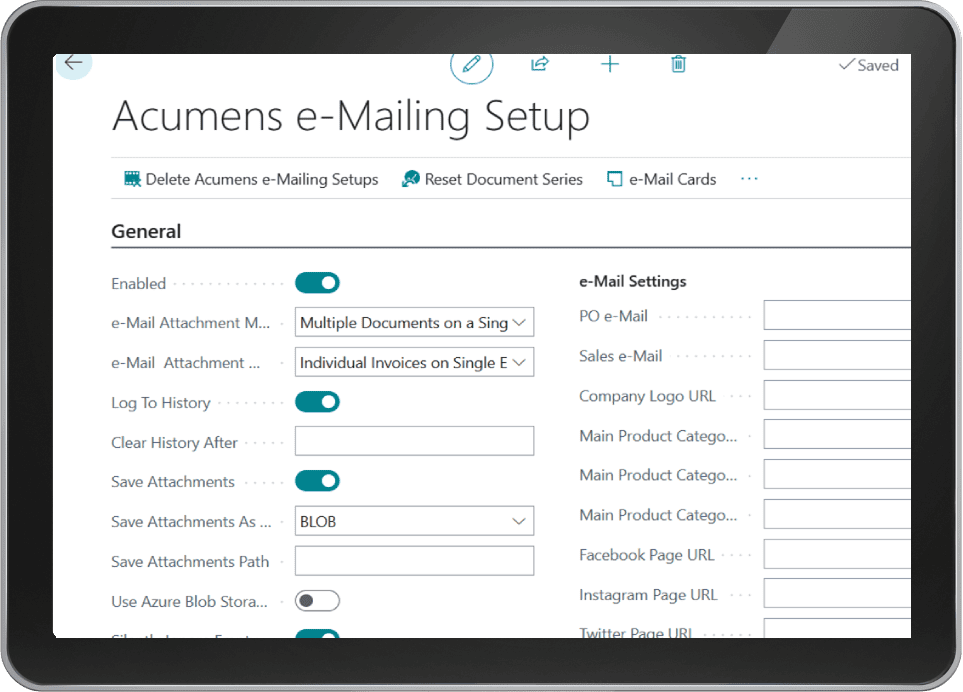
Deploying automated business central email templates through Acumens e-Mailing allows enterprise organizations to send transactional emails directly from core ERP modules. By connecting customized Word layouts, automated sender signatures, and cloud document attachments, accounting teams streamline daily customer communications, eliminate manual entry errors, and significantly improve operational productivity without leaving Microsoft Dynamics 365 Business Central.
Acumens E-Mailing Management App for Business Central
Table of Contents
- 1. Welcome to Acumens E-Mailing Management
- 2. Custom Layouts and MS Word Template Editing
- 3. Configuring E-Mail Cards and Default Templates
- 4. Managing Multiple Sender Details and Signatures
- 5. API Document Merging and Multi-Attachment Handling
- 6. External Cloud Storage Attachment Integrations
- 7. Workflow Automation, Audit Logging, and Compliance
- 8. Frequently Asked Questions Regarding Email Setup
1. Welcome to Acumens E-Mailing Management
Acumens e-Mailing allows you to send automated emails based on customizable business central email templates to clients across various operational departments. You can easily send singular transactional messages or initiate high-volume batch emailing routines. Furthermore, users can specify different recipient types, sender signatures, and custom attachments for Sales Orders, Sales Return Orders, Sales Invoices, Sales Quotes, Sales Credit Memos, Posted Sales Invoices, Posted Sales Shipments, Issued Reminders, Purchase Orders, and Customer Ledger Entries across your financial database network.
2. Custom Layouts and MS Word Template Editing
Creating professional layout designs is simple using native word processing tools. Our app utilizes MS Word layouts to define business central email templates. Users can export the template layout as a Word document, redesign allowable body sections, update company branding, adjust color schemes, incorporate custom corporate graphics, and re-import the updated file back into the ERP system seamlessly without requiring specialized developer assistance or complex programming code changes.
3. Configuring E-Mail Cards and Default Templates
E-Mail Cards are used to define and differentiate how various document emails are generated and dispatched to customers. By configuring your default business central email templates inside e-mail cards for each supported document type, system operators can send batch invoices and statements instantly without selecting a template manually during each checkout routine, saving valuable administrative hours every week and preventing operational dispatch errors.
4. Managing Multiple Sender Details and Signatures
Maintaining clear corporate identity across diverse departments requires flexible sender configurations. When leveraging modern business central email templates, the application supports multiple sender signatures, allowing outgoing communications to feature specialized signatures based on individual user profiles, specific company setups, or active account management roles across your global enterprise network.
5. API Document Merging and Multi-Attachment Handling
Managing several file attachments for a single client email can create inbox clutter, high bandwidth costs, and delivery failures. Linking your active business central email templates with Acumens e-Mailing integrates a custom API pipeline that merges multiple document attachments into a single consolidated PDF file prior to dispatching customer emails, improving deliverability, reducing storage sizes, and enhancing overall customer reading experiences.
6. External Cloud Storage Attachment Integrations
Outbound email routines can attach documents directly from trusted external storage platforms. Supported integrations include Azure Blob Storage, Microsoft OneDrive, and corporate Shared Network Drives, allowing finance teams to link large technical specifications, terms of service, and legal disclaimers effortlessly without cluttering internal database tables.
7. Workflow Automation, Audit Logging, and Compliance
Automating outbound email communication with enterprise business central email templates enforces organizational standards and strict audit compliance. System administrators can track dispatch logs, monitor delivery statuses, resend failed messages automatically, enforce cryptographic security protocols, and maintain detailed transactional archives to ensure all customer interactions remain transparent, legally compliant, and fully traceable across all operational business units.
8. Frequently Asked Questions Regarding Email Setup
How do custom Word layouts improve email deliverability? Utilizing clean HTML generated from structured Word layouts prevents formatting errors across webmail clients, ensuring customer invoices display cleanly on both mobile and desktop screens without broken rendering or missing attachments.
For additional details on system logs and operational data management, review our guide on Acumens History Management or examine official resources regarding Microsoft Dynamics 365 Architecture Models.