

Acumens Security Management
Acumens Security Management for Dynamics Business Central and Dynamics NAV is an add-on that provides both Application and Data security. Integrating robust application security management routines controls user access to various features of the application, whereas data security controls which specific data records the user has access to. These security controls can be defined easily per user or per user group across enterprise departments.
Protecting sensitive enterprise resource planning records requires strict permission boundaries and automated access governance. Enforcing granular page and field restrictions prevents unauthorized data modifications, eliminates data exposure risks, and maintains full compliance and operational security across all active business units.
Table of Contents
Field and Page Level Security Controls
Deploying comprehensive application security management capabilities within Business Central allows system administrators to manage page actions and field visibility precisely. The extension includes two primary level security mechanisms:
- 1. Page Level Security: There are two controls defined on the page level which are:
- Read only: This feature opens the pages on read-only mode i.e. no modification allowed, and page actions are disabled.
- Block Execution: This feature restricts user access to the page entirely.
- 2. Field Level Security: This feature allows for visibility and execution control on specific page features. The features Read, Hide or Edit controls can be defined for fields, fast tabs and subpages. For Page Actions you can hide or disable them based on user permissions.
Data Security Filters and User Setup Parameters
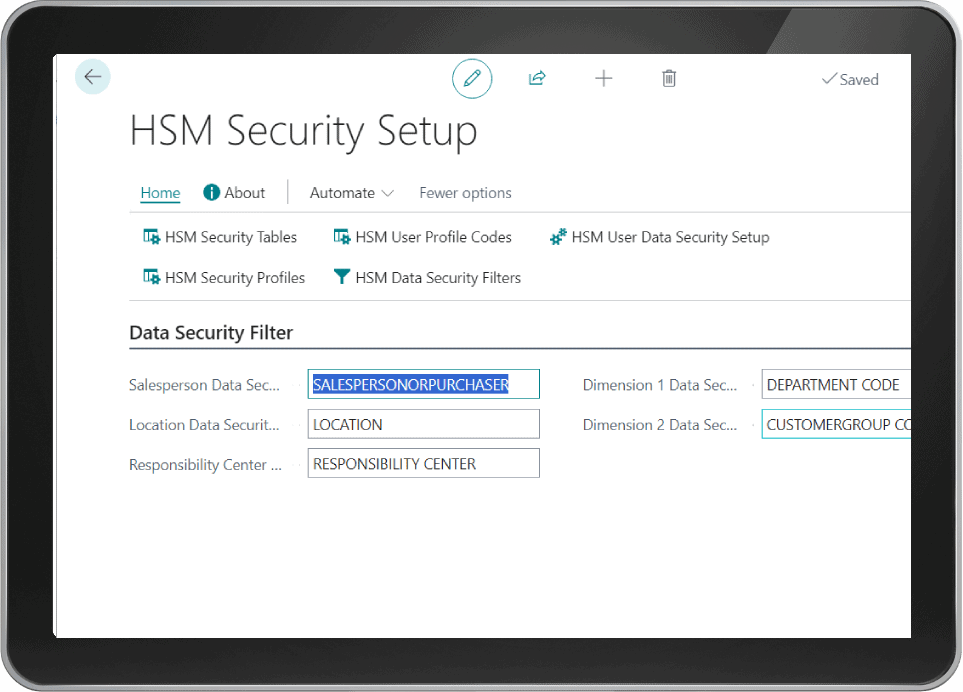
Utilizing enterprise application security management rules enables organizations to restrict data visibility based on user responsibility. The Data Security feature introduces control on application data that a user can have access to, based on filters defined on Security setup and applied to the record fields such as Salesperson Code, Location Code, Responsibility Center, Global Dimension 1, and Global Dimension 2. These filters apply automatically to all Standard Business Central records that contain these fields.
Additional Filters are defined on User Setup for Transfer-to and Transfer-from filters for Transfer Documents. Furthermore, an Individual Salesperson filter is also defined on User Setup to ensure strict record isolation across regional sales teams and warehouse operational staff.
Data Security Default Values and Workflow Enforcement
Enforcing consistent data entry routines requires automated field initialization. Deploying integrated application security management features configures default values for individual user accounts updated on user setup. These values serve as default parameters whenever assigned users create new transactions in the system.
The default Value fields include Salesperson Code, Location Code, Responsibility Center, Global Dimension 1, and Global Dimension 2 when creating Customer, Vendor, Sales Document, Purchase Document, or Service Document records. Similarly, default values for Default Transfer-from Code, Default Transfer-to Code, Global Dimension 1, and Global Dimension 2 initialize automatically for Transfer Documents.
Automating account defaults reduces repetitive manual data input while ensuring strict adherence to internal posting rules. System administrators can update permission boundaries dynamically without interrupting daily business operations, maintaining seamless workflow productivity while enforcing enterprise governance.
Having continuous, real-time security oversight safeguards critical accounting ledgers against unauthorized adjustments or accidental data deletion. Modern organizations rely on these advanced permission frameworks to achieve complete operational compliance and maintain flawless internal audit trails across global business units.
Driving Enterprise Data Governance
Deploying dedicated application security management solutions inside Business Central safeguards proprietary business data while providing a seamless, compliant environment for enterprise users.
For more details regarding core system configurations, check our guide on Acumens History Management or read official documentation on Microsoft Dynamics 365 Architecture Models.