

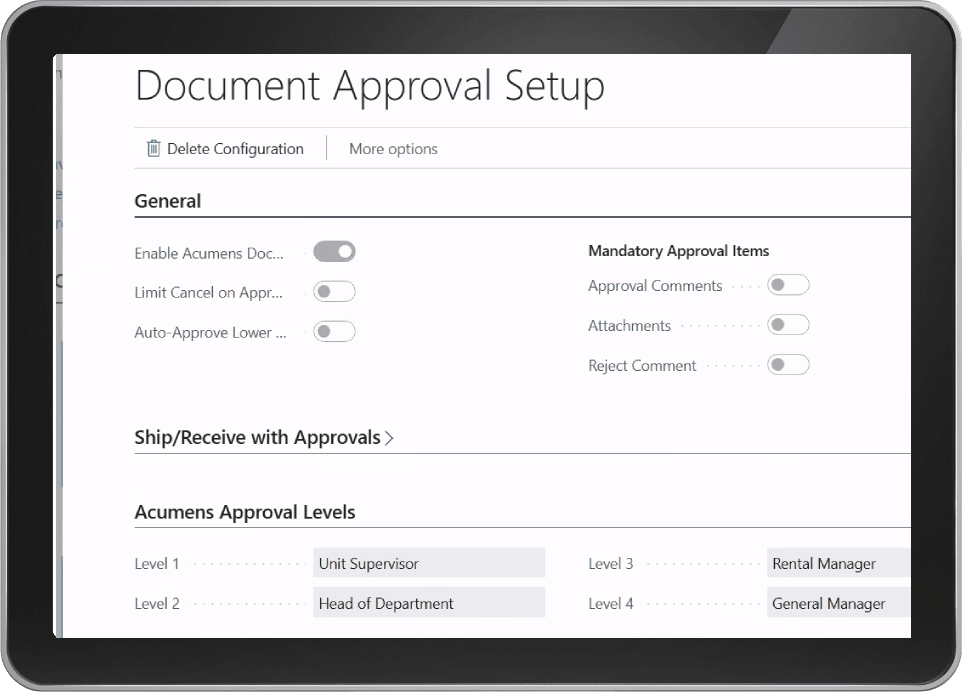
Acumens Flexible Document Approvals
The Acumens Flexible Document Approvals extension is a robust enterprise solution integrated into Microsoft Dynamics 365 Business Central, enhancing document review cycles across various key granules. Deploying structured document approval software tools straight inside your cloud ERP introduces a new level of operational precision, adaptability, and audit readiness. This application aims to streamline and optimize approval workflows for critical business transactions seamlessly.
Managing high-volume commercial approvals manually often creates operational friction and delays core business execution. Implementing automated validation frameworks ensures that every purchase order, sales quote, and inventory transfer undergoes systematic verification prior to posting. This structural alignment guarantees that corporate governance standards remain enforced across all operating departments without slowing down daily productivity.
Table of Contents
Supported Granules and Key Features
Utilizing high-performance document approval software functionalities within Business Central empowers back-office teams to coordinate complex review processes without creating operational friction. The extension covers seven core transaction granules to maintain complete governance over organizational workflows:
- 1. Sales Document Approval: Enables approval workflows for sales documents. Ensures a systematic review process for sales transactions, enhancing accuracy and compliance.
- 2. Purchase Document Approval: Facilitates the approval of purchase documents. Enhances control and accountability throughout the procurement process.
- 3. Item Journal Approval: Streamlines the approval process for item-related transactions, such as inventory adjustments and transfers. Ensures accurate tracking and validation of inventory movements.
- 4. General Journal Approval: Streamlines the approval process for general transactions, such as expenses, reconciliations, and adjustments.
- 5. Allow Item Receipt/Shipping: Governs the approval of item receipt and shipping transactions. Enhances visibility and control over inventory movements in and out of the organization.
- 6. Approval Notifications: The system sends notifications based on the users’ preferences. Users can choose Email, Notes, or Both.
- 7. Dynamic Approval Levels & Auto Approval: Dynamic approval levels allow for flexible and customizable approval levels and captions for documents. Auto Approval is setup when two approvers are defined on the same level and Alternate approval is selected, automatically cancelling secondary entries upon sign-off.
Optimizing Multi-Level Workflow Control
Running manual approval chains outside your primary ERP environment introduces massive operational bottlenecks and audit risks. Transitioning to native document approval software configurations anchors authorization updates directly onto active ledger entries. When commercial managers review pending purchase orders or evaluate inventory reclassifications, keeping all approval logic embedded within Business Central preserves operational security.
Furthermore, deploying automated notification channels prevents long-term balance delays between departmental teams. Approvers receive real-time alerts via email or system notes, allowing them to authorize transactions instantly. This systemic alignment eliminates unnecessary waiting times and keeps supply chain schedules moving efficiently.
Securing ERP Compliance and General Ledger Sync
Modern corporate environments require flexible administrative oversight to maintain strict accounting compliance. Utilizing verified document approval software controls enables enterprise platforms to enforce custom approval thresholds dynamically across multi-tenant locations. Finance officers gain full visibility over active transaction queues, ensuring that internal authorization policies remain enforced as sales volume grows.
Centralized authorization management also protects subledger balance sheet stability. By restricting posting privileges until all required sign-offs clear, your accounting department eliminates unauthorized manual adjustments. Everything stays transparent, accessible, and audit-ready inside your cloud infrastructure.
Eliminating off-system approval tracking safeguards corporate ledgers against unauthorized transaction posting. When managerial review chains execute natively within Business Central, internal control policies remain fully compliant during financial reporting cycles. This structural security protects balance sheet accuracy while simplifying regulatory compliance audits.
Driving Scalable Organizational Governance
Ultimately, long-term operational growth relies on standardized verification tracks and structured review workflows. Deploying comprehensive document approval software routines inside Business Central allows modern companies to optimize authorization workflows while maintaining complete regulatory compliance for future expansion.
For more details regarding core system configurations, check our guide on Acumens Flexible Contract Payments Summary or read official documentation on Microsoft Dynamics 365 Architecture Models.