

Acumens SalesTax & Address Verify
Acumens e-Tax (Enterprise) extends the standard Business Central and Dynamics Nav Sales Tax functionality by introducing address specific sales tax which is fetched from external APIs based on a validated address and customizations for special taxes. Deploying specialized sales tax automation software enables enterprise tax managers to maintain multi-jurisdictional compliance, streamline financial audits, and eliminate manual tax calculations across complex corporate structures.
Managing multi-state nexus requirements, local tax surcharges, and customer exemption certificates manually creates significant accounting risks and operational friction. Integrating real-time tax verification and automated address formatting directly within your central ERP environment protects bottom-line margins and ensures complete regulatory accuracy.
Table of Contents
Supported Tax & Address Verification APIs
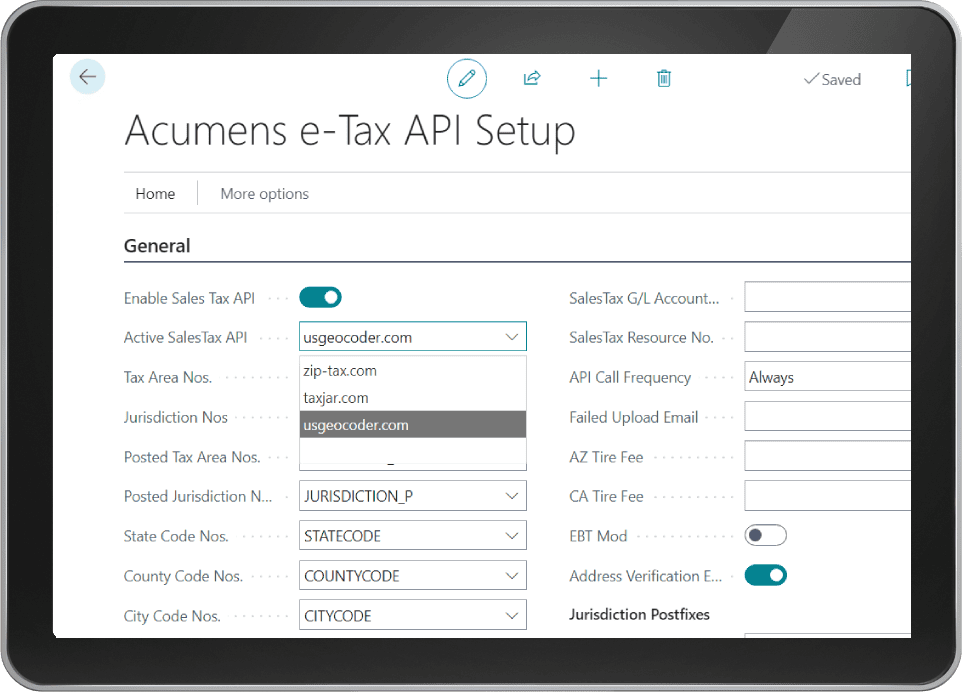
Deploying cloud sales tax automation software connects Business Central directly to external tax engines including TaxJar, ZipTax, USGeocoder, and Zamp. For address validation, the app integrates UPS.com, Smarty.com, and Zamp APIs. These external APIs operate on a subscription basis and can be configured one at a time for each category.
Key Submodules of Acumens e-Tax Enterprise
Utilizing enterprise sales tax automation software tools provides granular field controls and real-time calculation logic:
1. Address Specific Sales Tax: Sales Tax is calculated based on document specific address. The rates fetched from the API are real time.
2. Field Change controls: This feature ensures that the fields listed below trigger Sales Tax recalculation when changed on an open document. For Released documents, these fields are not editable:
- Ship-to Code
- Ship-to Address
- Ship-to City
- Ship-to County
- Ship-to Country
- Ship-to Zip Code
- Posting Date
3. Sales Tax Exemption: Sales Tax exemptions can be defined per customer per state. Exemptions are setup based on Sell-to Customer, Bill-to Customer, or Ship-to Address. Exemption types supported are user defined.
4. Hawaii Labor Exemptions: This feature applies to Hawaii Labor where labor is taxed regardless of customer exemption.
5. Reseller Use Tax: This is applicable to resellers where items for resale are not taxable but items that are consumed within the company are taxable.
6. Hawaii Reseller Exemptions: Resale Items in Hawaii attract a specific tax rate. This rate is defined by the state and the app allows for change whenever needed.
7. California Farmers: In the state of California, Farmers enjoy a reduced tax rate in state tax. Acumens e-Tax allows that reduction to be incorporated into the customer calculated tax.
8. Destination based and Origin based Sales Tax calculation: This feature controls which address (ship-to or ship-from) is used to calculate sales tax. Different states have different policies in this regard.
9. Retread Tax: In California, Retread taxable amount is 75% of the line item amount. Acumens e-Tax supports Retread Sales Tax calculations.
Exemptions, Tax Rules, and Reporting
Full-featured sales tax automation software capabilities streamline tax corrections, document updates, and audit reporting:
10. Credit Sales Tax: This feature allows for Sales Tax Amount correction without redoing the Sales document. Example: a Sales Order posted excess Sales Tax; a Credit Memo amount that is full tax is posted to correct it. It’s reflected on Sales Tax Reports.
11. Override Tax Rate: This feature allows for user to define specific rates for a customer if the rates fetched based on their address are not the rates they want to use.
12. Exact Tax Reversing: This ensures that when doing a document Credit Memo, the Tax Rate used on the original Invoice is the same rate used to reverse the document.
13. Freight Tax: Acumens e-Tax supports freight tax calculation based on the different variations in state rules regarding shipping tax.
14. Service Tax: Service Tax is also supported by Acumens e-Tax in a similar model with Freight Tax.
15. Extended Taxability: The App allows for Sales Tax Calculation variations based on dependencies i.e. an item can be taxable/non-taxable based on being sold with a specific resource or a resource in a specific resource group and vice versa. Resources can also be set to automatically add to a document if a certain item is being sold in a specific state.
16. Update of Posted documents: The App allows for Document Taxability and Ship-to / Return-from Address Updates. These changes trigger a recreation of the document sales tax entries for reporting. All these changes are logged.
17. Sales Tax Reporting:
- Sales Tax Report: Used to file Sales Tax with relevant tax authorities.
- Report Log: A log of reports ran and submitted.
- Override Documents: Allows an override on document taxability, can change from taxable to non-taxable and vice versa.
Driving Scalable Business Central Compliance
Integrating modern sales tax automation software solutions by SBC Dynamics ERP allows growing enterprises to automate complex state tax mandates effortlessly. Enterprise leaders can maintain complete fiscal transparency, optimize reporting cycles, and manage expanding regional markets with total financial confidence.
For more details, check our guide on Acumens History Management or read official documentation on Microsoft Dynamics 365 Architecture Models.